Project case study
Command Center
A local-first desktop workspace for editorial, recovery, and publishing operations
Status Internal Windows application
Command Center is the private operating environment behind emreersolmaz.com. It is a desktop application built with Electron around a local Astro interface, bringing materially different workflows into one coherent system without collapsing their boundaries. Separate studios handle structured recovery writing, private reflection, long-form essay development, image production, archive metadata, analytics, and release preparation. Local drafts and previews remain distinct from consequential writes, while desktop integration supplies runtime supervision, bounded external workspaces, workstation authentication, and controlled media capture. The result is not a generic dashboard, but an operational map for moving work from private source material toward reviewed public form.
Thesis
Command Center is a local-first Windows workspace that separates private source processing, editorial development, visual production, archive maintenance, and publication into explicit, reviewable operational rooms.
Representative artifact
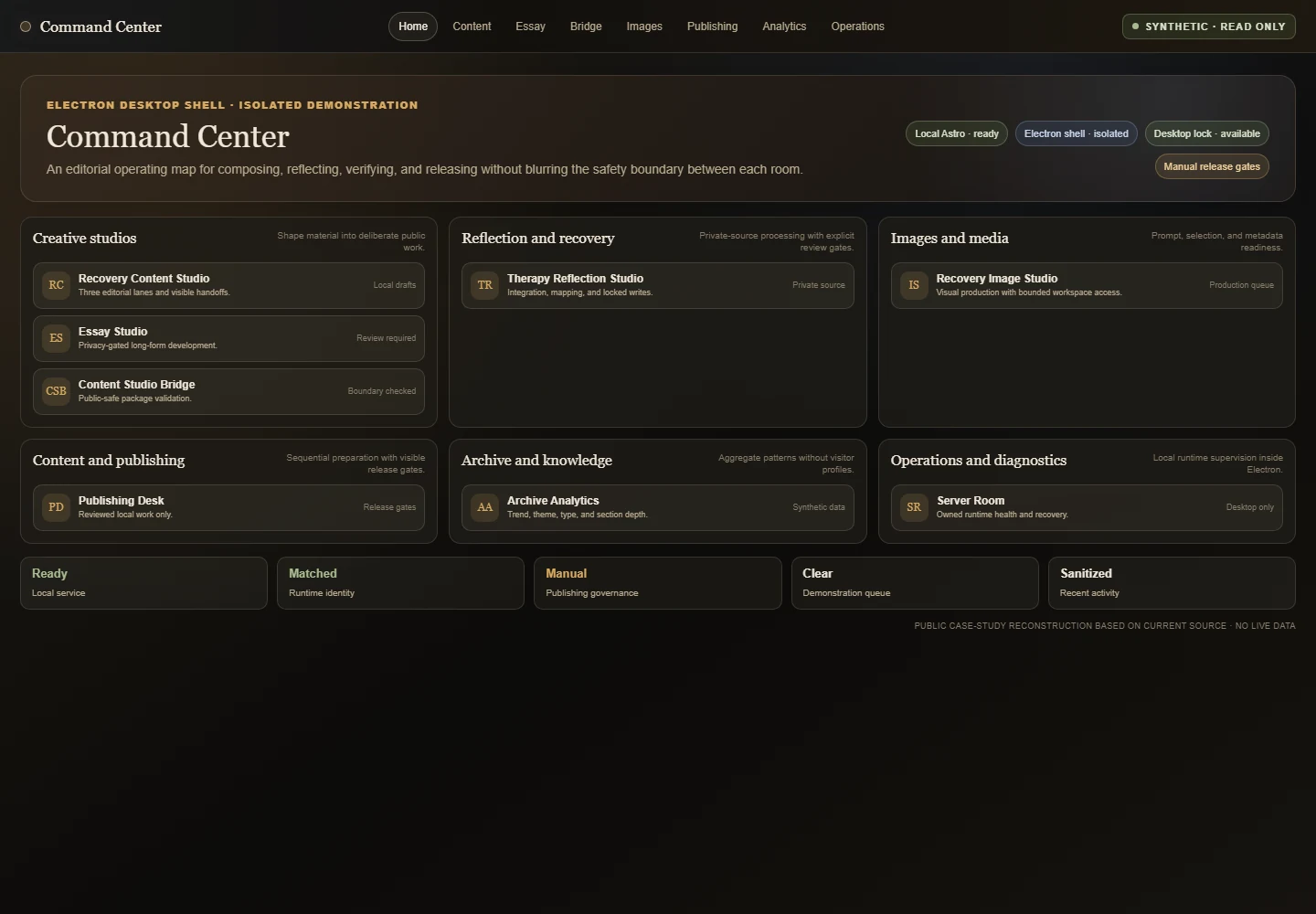
Command Center organizes the archive workflow into specialist operational rooms.
- Maturity
- Internal Windows application
- Disclosure
- Synthetic and de-identified interface state; no private source material is shown.
The problem
Command Center began with a practical problem: the public website was becoming the visible endpoint of a much larger private system. Work for the archive could begin as structured recovery material, a private reflection, a conceptual synthesis, or an unfinished essay. Images required a separate sequence of direction, external generation, visual evaluation, metadata, and local file handling. Publication required another sequence again: reviewing changes, validating the build, auditing assets, and deciding when the work was ready to leave the local environment.
These activities share material, but they do not share the same permissions or risks. A private source should not be treated like a public essay. A generated image should not become a finished asset merely because it exists. A metadata preview should not silently become a database write. A passing build should not authorize publication by itself.
Combining everything in one undifferentiated dashboard would make private source, local draft, public preview, consequential write, and release authority difficult to distinguish. The central product problem was therefore coordination without boundary collapse.
The system
Command Center is organized as a set of operational rooms. Recovery Content Studio develops structured recovery writing. Therapy Reflection Studio handles private source material through explicit integration, metadata, mapping, and review stages. Essay Studio moves approved material through intake, privacy decisions, interviews, outlines, draft briefs, revision, and public adaptation. Content Studio Bridge receives bounded public-safe packages before archive metadata work. Recovery Image Studio manages the visual-production queue. Archive Analytics examines aggregate patterns. Publishing Desk governs local release preparation, and Server Room supervises the local services that support the environment.
The coherence of the system comes from the relationship between those rooms. Each studio has a visible scope, state model, and set of permitted actions. Handoffs are explicit. Preview and write operations remain separate. Future capabilities can appear as locked architecture without being represented as executable. Private material can move toward public expression while preserving the stages where human judgment is required.
The product is designed for one operator, one trusted Windows workstation, and one closely governed website and archive. It is an internal operating environment, not a multi-user platform, public admin surface, or general-purpose productivity application.
How it works
Editorial and reflective workflows
The content studios hold work locally until a defined boundary is crossed. Drafts, mappings, queues, and previews can be resumed and inspected before any external or repository write. Recovery Content Studio combines assisted and manual stages across several structured writing lanes. Therapy Reflection Studio preserves a separate private-source process. Essay Studio includes substantial development and privacy review, while later publication and broader relation actions remain bounded rather than implied.
Content Studio Bridge accepts a public-safe handoff, validates its shape, previews metadata, and exposes only the currently authorized archive action. A successful preview does not grant relation, website-file, deployment, or publishing authority. This separation keeps assistance advisory until the operator deliberately chooses a consequential write.
Image production
Recovery Image Studio brings together source selection, visual direction, prompt preparation, an external rendering handoff, grid evaluation, candidate selection, metadata, local import, and a controlled save transaction. Queue and draft state remain recoverable through the process. Command Center prepares, evaluates, imports, and governs the work; rendering occurs through external services.
Some external workspace actions can receive bounded automation, but the interface of an external service remains outside Command Center’s control. When an expected control or image cannot be identified reliably, the workflow stops and returns to a manual path. Uncertainty is reported rather than converted into success.
Release and operational supervision
Publishing Desk presents release preparation as a sequence of review, commit readiness, build, operational diagnostics, image audit, and authorized push. It does not collapse content development, archive writes, asset preparation, and publication into one action. Archive Analytics uses aggregate information to understand content patterns without profiling individual visitors.
Server Room controls only a predefined set of local services. Before a process is adopted, replaced, or terminated, the desktop runtime verifies that it belongs to the expected application and workspace. An unrelated process occupying a required resource is refused rather than treated as disposable.
Architecture
Command Center combines a private Astro application with an Electron desktop shell. Astro supplies the studio interfaces and direct access to the website’s collections, schemas, local content, and validation commands. Electron adds application identity, single-instance behavior, managed local processes, workstation authentication, persistent embedded sessions, controlled media capture, and native file dialogs.
Privileged interface actions pass through a narrow preload bridge: a controlled channel of named operations between the interface and the desktop process. This bounded inter-process communication (IPC) avoids unrestricted Node access. External services run in isolated, sandboxed browser views without Node desktop or file capabilities and use separate persistent sessions. The desktop manages their bounds, lifecycle, allowed navigation behavior, capture, and explicit reset while leaving the external applications outside its authority.
Local persistence is layered rather than uniform. Interface preferences, drafts, queues, and workflow state may remain in local browser storage. Approved content and assets live in bounded workspaces, while separate desktop session partitions keep each embedded service’s cookies and storage isolated. Runtime ownership and desktop trust use distinct local records. Shared repository location does not erase the boundary between the public website and the private operating application.
The desktop lock model recognizes manual lock, Windows session lock, system suspend, and measured operating-system inactivity. Ordinary focus, minimization, and moving to another application do not become false security events. Windows Hello can reopen a trusted local workspace, while password authentication remains a separate fallback. These are explicit application controls, not a security certification.
Decisions and tradeoffs
Keeping the website and its operating environment in one repository avoids duplicating content schemas, validation scripts, and release knowledge. It also increases the importance of public/private build boundaries and narrow route scope. Command Center must be able to use the archive directly without making private studios part of the public site.
Building web-based studios inside Electron preserves ordinary interface development while adding OS capabilities only where required. The tradeoff is a more complex startup, identity, cookie, process, and lifecycle model, with Windows as the only verified packaged target and several native behaviors remaining manual release gates.
Separate rooms introduce more visible steps than a universal dashboard, but they make the consequence of an action legible. Local-first state and explicit writes create additional review work, yet prevent generation or interpretation from becoming publication by default. Embedded external sessions reduce context switching, while bounded automation and manual fallback acknowledge that external interfaces cannot be made fully reliable from inside the application.
Evidence and current status
-
Implemented operating environment
The repository contains an ownership-aware Electron runtime, a private Astro studio constellation, local health surfaces, bounded external workspaces, image capture and import, and sequential release tooling.
Qualification The application is internal, and not every studio or external integration has the same maturity.
-
Automated QA
Runtime ownership checks, desktop lock-policy checks, Electron QA, and visual QA passed during the accepted artifact stage.
Qualification This evidence does not establish security certification, deployment certification, installer readiness, or completion of native Windows manual gates.
-
Packaged target
Windows is the only verified configured packaged target.
Qualification Native Windows Hello completion, workstation lock and suspend behavior, installer packaging, and deployment remain manual or unexecuted release gates.
Current status
Command Center is an actively developed internal Windows application. Its ownership-aware desktop runtime, lock-policy logic, studio routes, image workflow, local release surfaces, and responsive visual system are covered by automated runtime, Electron, and visual QA. Native Windows Hello completion, workstation lock and suspend behavior, installer packaging, and deployment remain manual or unexecuted release gates.
Responsibility and limits
Private source and write boundaries
Command Center keeps private source, public-safe preview, bounded archive writes, website files, external rendering, and publication as separate authorities. Security and runtime controls are described as implemented boundaries, not as certification, and private admin surfaces remain inaccessible to the public case study.
Artifact record
Selected project artifacts
Architecture
A desktop runtime coordinates local studios, explicit write boundaries, and external services.
- Maturity
- Architecture diagram
Responsibility and limits
Private material moves toward public form through separate review and write boundaries.
- Maturity
- Architecture diagram
Editorial workflow
Structured source material is developed through visible editorial stages and parallel content lanes.
- Maturity
- Internal Windows application
- Disclosure
- Synthetic and de-identified interface state; no private source material is shown.
Private-to-public decision
Essay development begins by determining what may be used, abstracted, or excluded.
- Maturity
- Internal Windows application
- Disclosure
- Synthetic and de-identified interface state; no private source material is shown.
Sequence
Image workflow
-
A public-safe archive item enters the image workflow through explicit selection.
- Maturity
- Synthetic workflow sequence
- Disclosure
- Synthetic and de-identified interface state; no private queue or external account is shown.
-
The visual direction and generation prompt remain inspectable before external rendering.
- Maturity
- Synthetic workflow sequence
- Disclosure
- Synthetic and de-identified interface state; no private queue or external account is shown.
-
Generated candidates are evaluated visually before a final image is accepted.
- Maturity
- Synthetic workflow sequence
- Disclosure
- Synthetic and de-identified interface state; no private queue or external account is shown.
-
A selected candidate reaches metadata review before any controlled save transaction.
- Maturity
- Synthetic workflow sequence
- Disclosure
- Synthetic and de-identified interface state; no private queue or external account is shown.
What the project demonstrates
Command Center demonstrates how a personal software system can become operationally sophisticated without turning private life into undifferentiated data or consequential decisions into invisible automation. Its central achievement is not simply bringing tools together, but preserving the boundaries that make their coordination trustworthy.